> ## Documentation Index
> Fetch the complete documentation index at: https://alguna.com/docs/llms.txt
> Use this file to discover all available pages before exploring further.
# Manage Customers
> Learn how to create and edit customers
[Production](https://app.alguna.io/accounts) or
[Sandbox](https://app.sandbox.alguna.io/accounts)
## Adding a New Customer via Dashboard
In the **Customers** section, you can easily add new customers by clicking on **New Customer** CTA.
If you're looking to add customers via API or import from third parties,
follow [this guide](/migrations/sync-accounts).
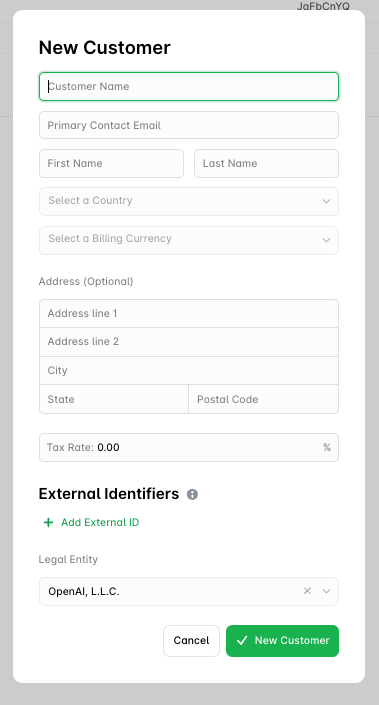
After the modal shows up, please follow these steps to input customer details:
 ### Customer Information
* **Customer Name**: Enter the full name of the customer or organization.
* **Primary Contact Email**: Provide the primary email address for customer correspondence. This email will be used for invoices, updates, and notifications.
* **First Name / Last Name**: Input the first and last name of the primary contact person associated with the account.
### Location Details
* **Country**: Select the country where the customer is based from the dropdown menu.
* **Billing Currency**: Choose the preferred billing currency for this customer, in accordance with ISO 4217 standards.
* **Address (Optional)**:
* **Address Line 1**: Enter the primary address for the customer.
* **Address Line 2**: (Optional) Enter any additional address details.
* **City**: Input the city for the customer’s address.
* **State**: Enter the state or region (if applicable).
* **Postal Code**: Input the postal code or ZIP code.
### Tax Information
* **Tax Rate**: If applicable, enter the tax rate for this customer. This rate will be applied to their invoices. The default value is set to `0.00%`. If you have an integration set up to manage taxes, this will be automatically managed by the integration.
### External Identifiers
* **Add External ID**: Add any external identification codes, if necessary. These can be used to link the customer to an external system for tracking purposes.
### Legal Entity
* **Legal Entity**: Select the legal entity under which this customer will be billed. This ensures accurate invoice generation.
### Parent Customer (Optional)
* **Parent Customer**: Assign this customer as a child of the selected customer. See [Customer Families](/customers/customer-families) for more details.
***
# Editing Customers
The **Customer Profile** page allows you to manage key details for each customer, including billing preferences, contact information, and payment methods. Below is a breakdown of the various sections and how to manage them.
### Customer Information
* **Customer Name**: Enter the full name of the customer or organization.
* **Primary Contact Email**: Provide the primary email address for customer correspondence. This email will be used for invoices, updates, and notifications.
* **First Name / Last Name**: Input the first and last name of the primary contact person associated with the account.
### Location Details
* **Country**: Select the country where the customer is based from the dropdown menu.
* **Billing Currency**: Choose the preferred billing currency for this customer, in accordance with ISO 4217 standards.
* **Address (Optional)**:
* **Address Line 1**: Enter the primary address for the customer.
* **Address Line 2**: (Optional) Enter any additional address details.
* **City**: Input the city for the customer’s address.
* **State**: Enter the state or region (if applicable).
* **Postal Code**: Input the postal code or ZIP code.
### Tax Information
* **Tax Rate**: If applicable, enter the tax rate for this customer. This rate will be applied to their invoices. The default value is set to `0.00%`. If you have an integration set up to manage taxes, this will be automatically managed by the integration.
### External Identifiers
* **Add External ID**: Add any external identification codes, if necessary. These can be used to link the customer to an external system for tracking purposes.
### Legal Entity
* **Legal Entity**: Select the legal entity under which this customer will be billed. This ensures accurate invoice generation.
### Parent Customer (Optional)
* **Parent Customer**: Assign this customer as a child of the selected customer. See [Customer Families](/customers/customer-families) for more details.
***
# Editing Customers
The **Customer Profile** page allows you to manage key details for each customer, including billing preferences, contact information, and payment methods. Below is a breakdown of the various sections and how to manage them.
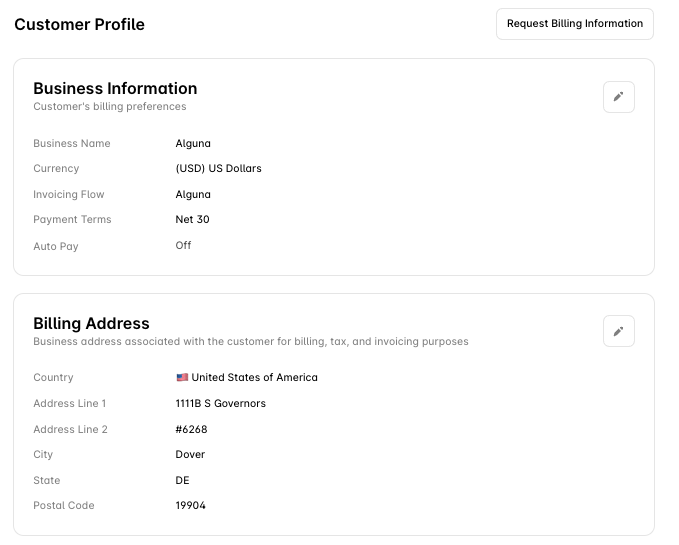 ***
### Business Information
This section shows the customer’s billing preferences.
* **Business Name**: The registered name of the customer's business.
* **Currency**: The currency in which the customer prefers to be billed.
* **Invoicing Flow**: Indicates which invoicing process is applied to this customer.
* **Payment Terms**: The agreed payment terms for the customer, e.g. **Net 30** (payment is due 30 days after the invoice date).
* **Auto Pay**: Whether or not auto payment is enabled.
***
### Billing Address
The address used for billing, tax, and invoicing purposes.
* **Country**: The customer's billing country.
* **Address Line 1 & 2**: The full address details.
* **City**: The city where the customer is located.
* **State**: The state or region.
* **Postal Code**: The postal code.
***
### Tax Settings
This section manages customer-specific tax rates and obligations.
* **Country (Optional)**: The country for which tax settings apply.
* **Tax ID (Optional)**: The Tax ID or VAT number.
* **Tax Rate**: The applicable tax rate for this customer.
***
### External Identifiers (Aliases)
Identifiers from your internal systems, often used for usage-based metering. These connected account IDs serve as aliases by default.
* **Alias**: The identifier or alias for the customer.
***
### Contacts
Manage the customer’s primary contact information and email preferences.
* **Primary Contact Information**:
* **Name**: The primary contact's name.
* **Email**: The email address for this contact.
* **Email Preferences**: The contact’s email preferences.
* Example: **Billing**, **Updates**, **Legal**
To add a new contact, click **+ New Contact**.
***
***
### Business Information
This section shows the customer’s billing preferences.
* **Business Name**: The registered name of the customer's business.
* **Currency**: The currency in which the customer prefers to be billed.
* **Invoicing Flow**: Indicates which invoicing process is applied to this customer.
* **Payment Terms**: The agreed payment terms for the customer, e.g. **Net 30** (payment is due 30 days after the invoice date).
* **Auto Pay**: Whether or not auto payment is enabled.
***
### Billing Address
The address used for billing, tax, and invoicing purposes.
* **Country**: The customer's billing country.
* **Address Line 1 & 2**: The full address details.
* **City**: The city where the customer is located.
* **State**: The state or region.
* **Postal Code**: The postal code.
***
### Tax Settings
This section manages customer-specific tax rates and obligations.
* **Country (Optional)**: The country for which tax settings apply.
* **Tax ID (Optional)**: The Tax ID or VAT number.
* **Tax Rate**: The applicable tax rate for this customer.
***
### External Identifiers (Aliases)
Identifiers from your internal systems, often used for usage-based metering. These connected account IDs serve as aliases by default.
* **Alias**: The identifier or alias for the customer.
***
### Contacts
Manage the customer’s primary contact information and email preferences.
* **Primary Contact Information**:
* **Name**: The primary contact's name.
* **Email**: The email address for this contact.
* **Email Preferences**: The contact’s email preferences.
* Example: **Billing**, **Updates**, **Legal**
To add a new contact, click **+ New Contact**.
***